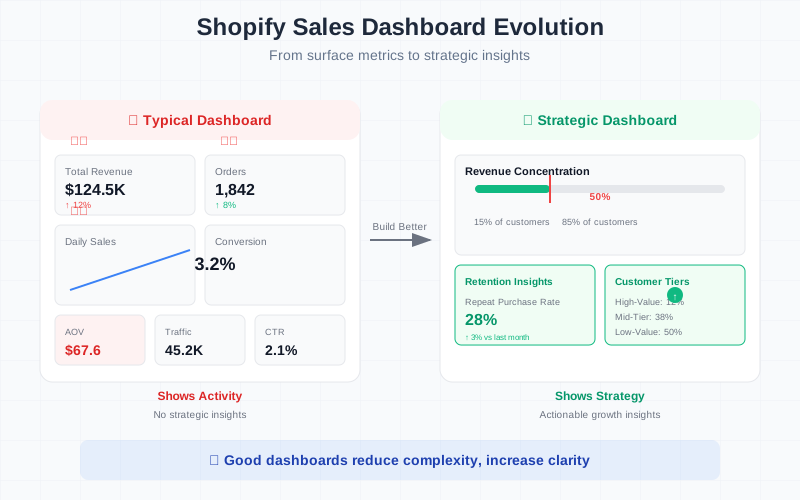
How to Build a Shopify Sales Dashboard (That Actually Helps You Grow)
Most Shopify sales dashboards look impressive.
Charts.
Graphs.
Revenue numbers everywhere.
But most of them don’t actually help you make better decisions.
They show activity — not insight.
If you’re building a Shopify sales dashboard, here’s how to do it properly.
🎯 Step 1: Decide What the Dashboard Is For
Before adding charts, ask:
Is this dashboard for:
- Monitoring daily performance?
- Understanding growth drivers?
- Identifying retention issues?
- Analyzing customer value?
Most brands mix everything into one messy screen.
A strong Shopify sales dashboard focuses on growth clarity, not just reporting.
📊 Step 2: Track Core Revenue Metrics
Start with the foundations:
✅ Total Revenue
Daily, weekly, monthly trend.
✅ Orders
Track order volume separately from revenue.
✅ Average Order Value (AOV)
Revenue ÷ Orders.
✅ Revenue by Channel
Paid ads, email, organic, direct.
But don’t stop here.
These are surface metrics.
🔁 Step 3: Add Retention Metrics (Most Dashboards Skip This)
Retention drives sustainable growth.
Add:
✅ Repeat Purchase Rate
% of customers who bought more than once.
✅ Revenue from Returning Customers
What portion of revenue comes from repeat buyers?
✅ Cohort Retention (Optional Advanced View)
Track how customer groups behave over time.
Without retention metrics, your dashboard is incomplete.
👥 Step 4: Add Customer Distribution Metrics
This is where most dashboards fail.
Add structure insights like:
✅ Revenue Concentration
What % of customers generate 50% of revenue?
✅ High-Value Customer Segment
Identify top 10–20% customers by lifetime value.
✅ Revenue by Customer Tier
Break customers into:
- High-value
- Mid-tier
- Low-value
This transforms your dashboard from reporting tool → strategy tool.
📦 Step 5: Add Product-Level Insights
Your Shopify dashboard should also reveal:
✅ Revenue by Product
Top revenue drivers.
✅ Repeat Purchase by Product
Which products generate loyal buyers?
✅ One-Time Purchase Products
Products that fail to retain customers.
Products influence retention more than most brands realize.
🧠 Step 6: Visualize Trends — Not Just Totals
Good dashboards show:
📈 Trends over time
📉 Drops and anomalies
📊 Distribution curves
Bad dashboards show static totals.
You want to quickly answer:
- Is retention improving?
- Is growth coming from acquisition or repeat buyers?
- Is revenue becoming more concentrated?
If your dashboard can’t answer those questions in under 2 minutes, simplify it.
🛠 How to Build It (3 Options)
Option 1: Shopify Native Analytics
Simple, but limited. Doesn’t show deep distribution or concentration.
Option 2: Export to Excel + Manual Dashboard
Flexible, but time-consuming. Requires pivot tables and maintenance.
Option 3: AI-Powered Analytics Tool
Upload data. Ask growth-focused questions. Get automatic breakdowns.
No manual dashboard building.
🚀 What a “Good” Shopify Sales Dashboard Feels Like
When built correctly, your dashboard should:
✅ Reduce decision fatigue
✅ Highlight structural weaknesses
✅ Show what truly drives revenue
✅ Make growth levers obvious
If it only tells you revenue went up or down, it’s not strategic enough.
Final Thought
A Shopify sales dashboard shouldn’t just track performance.
It should reveal:
- Who drives revenue
- What drives retention
- Where growth actually comes from
Because clarity scales.
Complexity doesn’t.
If your current dashboard feels overwhelming, it’s probably showing too much — and revealing too little.