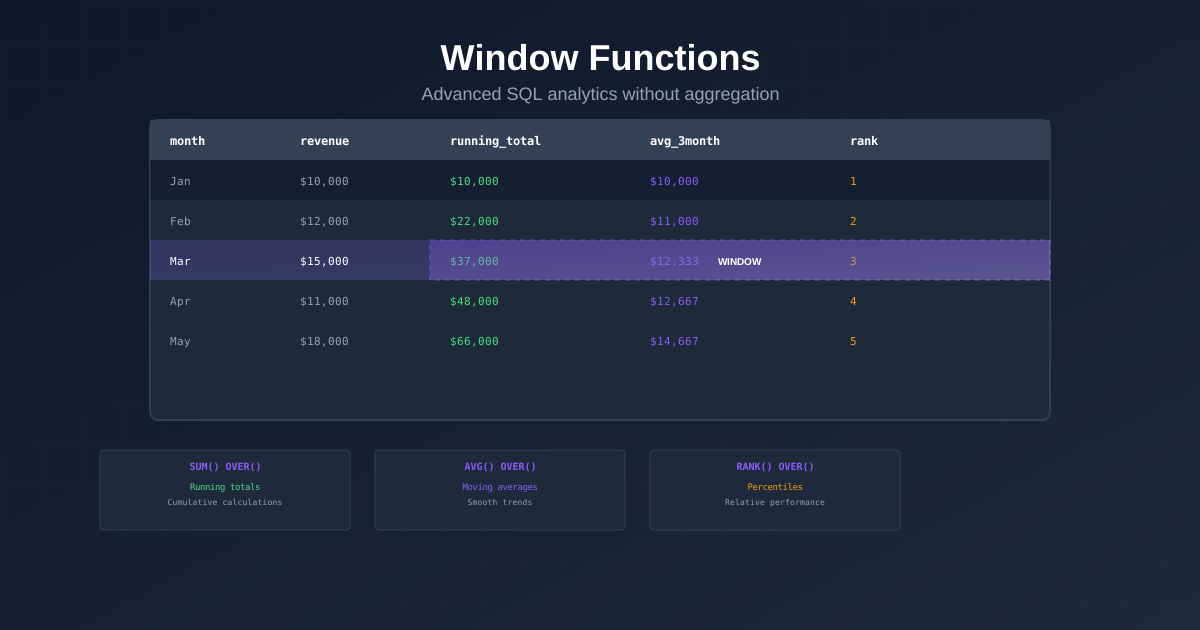
Window functions are one of SQL's most powerful features for analytics. Unlike regular aggregations, they let you calculate values across rows without collapsing your result set.
If you're doing any kind of business analytics with PostgreSQL, these are the window functions you need to know.
What Are Window Functions?
A window function performs a calculation across a set of rows that are somehow related to the current row. Think of it as a "sliding window" over your data.
The basic syntax:
function_name() OVER (
  PARTITION BY column
  ORDER BY column
  ROWS BETWEEN start AND end
)
1. Running Total (Cumulative Sum)
Track how a metric accumulates over time.
SELECT
  DATE_TRUNC('month', created_at) AS month,
  SUM(total_amount) AS monthly_revenue,
  SUM(SUM(total_amount)) OVER (ORDER BY DATE_TRUNC('month', created_at)) AS cumulative_revenue
FROM orders
GROUP BY 1
ORDER BY 1;
Use case: Tracking progress toward annual revenue goals.
2. Ranking
Rank items within groups — top products, top customers, top regions.
SELECT
  product_name,
  category,
  total_revenue,
  RANK() OVER (PARTITION BY category ORDER BY total_revenue DESC) AS rank_in_category
FROM (
  SELECT
    p.product_name,
    p.category,
    SUM(oi.quantity * oi.unit_price) AS total_revenue
  FROM order_items oi
  JOIN products p ON p.product_id = oi.product_id
  GROUP BY p.product_name, p.category
) sub;
Use case: Finding the top 3 products in each category.
3. Month-over-Month Growth
Calculate percentage change between consecutive periods.
SELECT
  month,
  revenue,
  LAG(revenue) OVER (ORDER BY month) AS prev_month_revenue,
  ROUND(
    (revenue - LAG(revenue) OVER (ORDER BY month)) * 100.0
    / NULLIF(LAG(revenue) OVER (ORDER BY month), 0),
    1
  ) AS growth_pct
FROM (
  SELECT
    DATE_TRUNC('month', created_at) AS month,
    SUM(total_amount) AS revenue
  FROM orders
  GROUP BY 1
) sub
ORDER BY month;
Use case: Monthly business review reports.
4. Moving Average
Smooth out noise in your data to see the real trend.
SELECT
  order_date,
  daily_revenue,
  AVG(daily_revenue) OVER (
    ORDER BY order_date
    ROWS BETWEEN 6 PRECEDING AND CURRENT ROW
  ) AS seven_day_avg
FROM (
  SELECT
    DATE_TRUNC('day', created_at) AS order_date,
    SUM(total_amount) AS daily_revenue
  FROM orders
  GROUP BY 1
) sub
ORDER BY order_date;
Use case: Filtering out daily volatility to see weekly trends.
5. Percentile / Distribution
Understand the distribution of a metric, not just the average.
SELECT
  NTILE(10) OVER (ORDER BY lifetime_value) AS decile,
  MIN(lifetime_value) AS min_value,
  MAX(lifetime_value) AS max_value,
  COUNT(*) AS customer_count
FROM (
  SELECT customer_id, SUM(total_amount) AS lifetime_value
  FROM orders
  GROUP BY customer_id
) sub
GROUP BY decile
ORDER BY decile;
Use case: Understanding customer value distribution for segmentation.
6. First and Last Values
Find the first or last value in a sequence — useful for attribution and journey analysis.
SELECT
  customer_id,
  FIRST_VALUE(utm_source) OVER (
    PARTITION BY customer_id
    ORDER BY created_at
  ) AS first_touch_channel,
  LAST_VALUE(utm_source) OVER (
    PARTITION BY customer_id
    ORDER BY created_at
    ROWS BETWEEN UNBOUNDED PRECEDING AND UNBOUNDED FOLLOWING
  ) AS last_touch_channel
FROM orders;
Use case: Marketing attribution — understanding which channels bring customers in vs. which close the sale.
Skip the SQL
Every analysis above can be done by simply asking Smart Query a question:
"Show me cumulative revenue by month"
"What's the month-over-month revenue growth rate?"
"Rank my products by revenue within each category"
Smart Query generates optimized window functions automatically. You get the same analytical power without writing a single line of SQL.